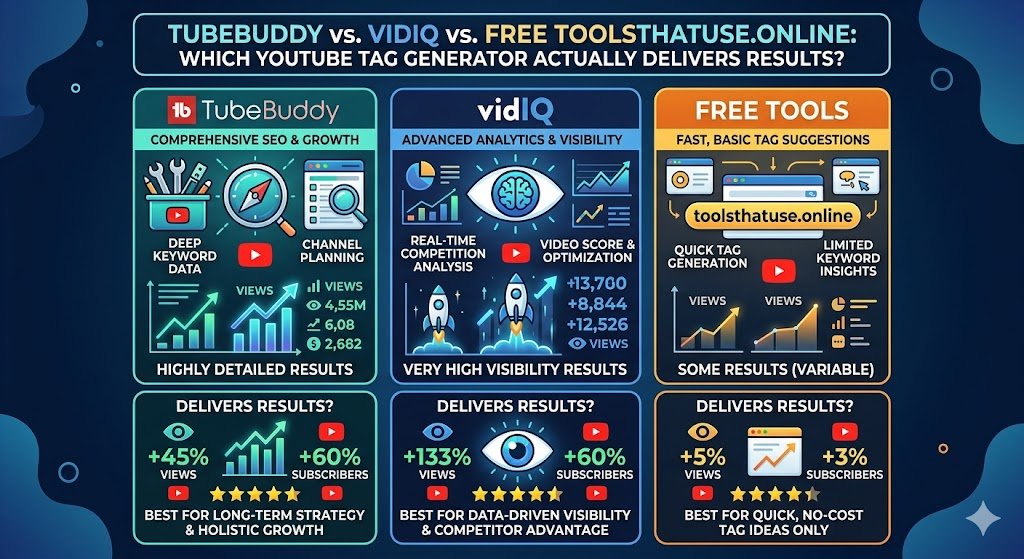
TubeBuddy vs. VidIQ vs. Free Tools: Which YouTube Tag Generator Actually Delivers Results?
If you’ve spent any time trying to grow a YouTube channel, you’ve heard the same advice: use better tags. But with dozens of tag tools available, choosing the right YouTube Tag Generator can feel overwhelming. Do you pay for a premium suite like TubeBuddy or VidIQ, or can a free YouTube Tag Generator give you everything you need?
In this head‑to‑head comparison, we’ll put three popular options to the test: TubeBuddy, VidIQ, and the completely free YouTube Tag Generator available right here on ToolsThatUse.Online. By the end, you’ll know exactly which YouTube Tag Generator fits your budget, your workflow, and your channel’s goals.
Ultimate Guide to Using a YouTube Tag Generator
Why Your Choice of YouTube Tag Generator Matters
Before we dive into the comparison, let’s quickly recap why a YouTube Tag Generator is essential. Tags are one of the primary ways YouTube’s algorithm understands your video. They help your content appear in search results, suggested videos, and even voice search.
But not all YouTube Tag Generator tools are created equal. Some provide basic keyword lists; others offer deep analytics, competitor insights, and integration directly inside YouTube Studio. The right YouTube Tag Generator can save you hours of manual research and uncover high‑value keywords you’d never think of on your own.
Overview of the Contenders
1. TubeBuddy – The All‑in‑One YouTube Management Suite
TubeBuddy is a browser extension that integrates directly into YouTube. Its tag tools are part of a much larger feature set that includes bulk processing, A/B testing, and SEO scoring. TubeBuddy’s YouTube Tag Generator component is often called the “Tag Explorer” or “Keyword Explorer.”
2. VidIQ – The Data‑Driven Growth Assistant
VidIQ is TubeBuddy’s main competitor. Like TubeBuddy, it installs as a browser extension and overlays analytics on YouTube. Its YouTube Tag Generator is embedded in the “Keyword Inspector” tool, which shows search volume, competition scores, and even trending keywords.
3. ToolsThatUse.Online – The Free, No‑Signup YouTube Tag Generator
Our own YouTube Tag Generator is a simple, web‑based tool. You enter your video title or a few keywords, and it instantly generates a list of relevant tags. There are no subscriptions, no logins, and no limits. It’s designed for creators who want a fast, effective YouTube Tag Generator without the bloat.
Feature Comparison: How Each YouTube Tag Generator Stacks Up
We evaluated each tool across five key criteria that matter most to creators: ease of use, tag quality, additional SEO features, pricing, and integration.
Ease of Use
| Tool | Ease of Use |
|---|---|
| TubeBuddy | Moderate. The Tag Explorer has many filters (search volume, competition, etc.), which can be overwhelming for beginners. |
| VidIQ | Moderate to advanced. The Keyword Inspector provides rich data, but the interface is packed with metrics. |
| ToolsThatUse.Online | Very easy. Paste your title, click generate, and get tags. No learning curve. |
Winner: ToolsThatUse.Online for pure simplicity.
Tag Quality & Relevance
| Tool | Tag Quality & Relevance |
|---|---|
| TubeBuddy | Excellent. It pulls from YouTube’s autocomplete and shows related keywords. It often surfaces long‑tail tags that are highly relevant. |
| VidIQ | Excellent. It also uses autocomplete and provides a “keyword score” that predicts how easy it is to rank. |
| ToolsThatUse.Online | Very good. It generates a balanced mix of broad and specific tags based on semantic analysis. While it doesn’t show search volume, the tag suggestions are consistently relevant. |
Winner: Tie between TubeBuddy and VidIQ for depth; ToolsThatUse.Online excels for relevance without clutter.
Additional SEO Features
TubeBuddy and VidIQ are not just YouTube Tag Generator tools; they are full channel management platforms. They offer:
- Competitor tag analysis – see what tags your rivals use.
- SEO scorecards – grade your video’s optimization.
- Suggested tags based on top videos – one‑click addition.
- Bulk tag updates across multiple videos.
Our YouTube Tag Generator focuses exclusively on generating tags. It does not provide competitor insights or SEO scoring, but it pairs well with other free tools on our site (Title Generator, Description Generator, etc.) to create a complete SEO workflow.
Pricing
| Tool | Pricing |
|---|---|
| TubeBuddy | Freemium. Free version offers limited tag suggestions. Paid plans start at ~$9/month for Pro, $19/month for Star. |
| VidIQ | Freemium. Free version shows some keyword data. Pro starts at ~$7.50/month, Boost at ~$39/month. |
| ToolsThatUse.Online | Free forever. No credit card, no trial. Unlimited usage. |
Winner: ToolsThatUse.Online for cost‑effectiveness.
Integration with YouTube Studio
TubeBuddy and VidIQ shine here because they live inside YouTube. You can generate tags without leaving your video edit screen. This integration saves time and keeps your workflow seamless.
Our YouTube Tag Generator is a separate web page. You copy the generated tags and paste them into YouTube Studio. It’s one extra step, but still fast—and you don’t have to install any browser extensions.
Head‑to‑Head: Real‑World Tag Generation Test
To see how each YouTube Tag Generator performs, we used a sample video title: “How to Start a YouTube Channel for Beginners 2026”.
- TubeBuddy Tag Explorer returned 30+ tags, including “start youtube channel,” “youtube channel setup,” “beginner youtuber tips,” and long‑tail phrases like “how to start a youtube channel step by step.” It also displayed search volume and competition scores.
- VidIQ Keyword Inspector gave similar suggestions but added a “keyword score” (0‑100) and a “trending” indicator. It also showed suggested tags from top ranking videos.
- ToolsThatUse.Online YouTube Tag Generator produced a clean list: “how to start a youtube channel,” “youtube for beginners,” “start a youtube channel 2026,” “youtube channel ideas,” “beginner youtuber,” and several others. No metrics, but all tags were directly relevant.
All three tools generated usable tags. The premium tools provided additional data to prioritize tags, while the free YouTube Tag Generator offered a solid starting point with zero friction.
Who Should Use Which YouTube Tag Generator?
Choose TubeBuddy if…
- You want a single tool for bulk management, A/B testing, and deep tag research.
- You don’t mind a subscription fee.
- You prefer to work entirely inside YouTube Studio.
Choose VidIQ if…
- You’re data‑obsessed and want search volume, competition scores, and trend insights.
- You need competitor tag analysis to reverse‑engineer successful videos.
- You value a clean dashboard with video health scores.
Choose ToolsThatUse.Online YouTube Tag Generator if…
- You’re on a tight budget (free is a game‑changer).
- You want a simple, no‑signup YouTube Tag Generator that just works.
- You prefer to keep your toolset lightweight and combine multiple free utilities.
- You’re a beginner who needs an easy entry into YouTube SEO without overwhelming features.
How to Maximize Results with Any YouTube Tag Generator
Regardless of which YouTube Tag Generator you pick, follow these best practices to get the most out of your tags:
- Mix broad and long‑tail tags. Broad tags (e.g., “cooking”) bring volume; long‑tail tags (e.g., “easy 30‑minute pasta recipe”) bring targeted viewers.
- Place important tags in the first 3–5 slots. YouTube gives more weight to early tags.
- Use tags in your description and transcript. A YouTube Tag Generator gives you keywords; repeating them naturally in your text reinforces relevance.
- Review and refresh tags after 30 days. Use your YouTube Tag Generator to add new trending terms and remove underperforming ones.
- Combine with other SEO tools. If you use a simple YouTube Tag Generator, pair it with a title generator and description generator to cover all bases.
Frequently Asked Questions
Is a paid YouTube Tag Generator worth the money?
It depends on your stage. For new creators with limited budgets, a free YouTube Tag Generator like ours provides excellent value. As you scale and need competitor insights, bulk editing, or advanced analytics, upgrading to TubeBuddy or VidIQ can pay for itself through time saved and increased views.
Can I use multiple YouTube Tag Generator tools together?
Absolutely. Many creators use a free YouTube Tag Generator for quick brainstorming and then cross‑check ideas with a paid tool’s data. There’s no rule against combining resources.
Will a YouTube Tag Generator guarantee my video ranks?
No tool guarantees rankings. A YouTube Tag Generator ensures you’re using the right keywords, but your video’s success also depends on thumbnail, title, watch time, and engagement. Think of tags as the foundation—you still need to build a compelling house on top of it.
Does ToolsThatUse.Online offer any other SEO tools?
Yes. In addition to our YouTube Tag Generator, we provide a Title Generator, Description Generator, Thumbnail Extractor, Word Counter, and more—all free. Together, they form a complete creator toolkit.
Final Verdict: Which YouTube Tag Generator Is Right for You?
If you need a YouTube Tag Generator that integrates deeply with YouTube and provides robust analytics, TubeBuddy or VidIQ are excellent choices. They offer more than just tags; they’re full‑fledged channel management platforms.
But if you want a YouTube Tag Generator that is fast, free, and surprisingly powerful, our tool at ToolsThatUse.Online is the perfect solution. You get unlimited tag generation without ever reaching for your wallet. It’s especially ideal for beginners, small channels, or anyone who prefers a clean, straightforward tool.
Conclusion: Stop Guessing, Start Generating
Tags shouldn’t be an afterthought. With the right YouTube Tag Generator, you can transform your video’s discoverability and reach a wider audience. Whether you choose TubeBuddy, VidIQ, or our free YouTube Tag Generator, the most important step is to start using one consistently.
We built our YouTube Tag Generator to give every creator equal access to smart keyword suggestions. No subscription, no catch—just better tags in seconds. Try it today and see how the right YouTube Tag Generator can elevate your YouTube game.
One Comment